Accessibility Mode
Click here to disable accessibility mode and re-enable page styles.Create your own arcade2000 games!
Most of arcade2000's developer features are now publicly available for free! You can create a game and post its scores to an online
arcade2000 chart. Players can upload their own banners, decorators, PFPs, and homepages. They can pin their rank to their badge board
to brag about it across the entire site (even in other games' charts!). And you can add achievements and subscores which allow for
some really interesting filtered charts via the  button in the charts!
Wondering why you should connect your game to arcade2000's online high score charts? Hopefully this page will convince you! (Note the "why connect" page pitches some features like replays that aren't available to community games yet. Making something big and cool? Email admin@arc.hiddenade2000.io and ask about a full fledged dev account!)
NOTE: arcade2000's game API is a free service provided without warranty of any kind. By using it you agree not to hold arcade2000 liable for anything whatsoever, including but not limited to bugs, outages, etc. At the time of this writing arcade2000 is a site built, maintained, and paid for by a single person. I hope I can keep it free forever, regardless of the size of your game, but can't guarantee server and storage costs will always allow that. Please be considerate, and understand that while I would like to offer support (time allowing), I'm under no obligation to do so. Thanks for using arcade2000!
Implementation example
The three basic things you need to figure out in your engine: device ID, submit a web request for score submission, open a browser for score chart.
Here's a code example in Godot. If you are using a different engine and need help, feel free to email me at admin@arc.hiddenade2000.io.
a2_community.gd
Here's a simple game example in Godot, along with a manual test interface similar to the query string generator on this page. godot_community_example.zip
Create your game
To create arcade2000 games, you must have an arcade2000 account. To get one, you have to put up a score in a game. You can consider this to be the site's "captcha" against bots creating accounts. So for example, you could go download Kersploosh! for free, run the game, type in a name for your account, get a game over, then press 'C' to go to the game's high score chart. You will "soft login" to your account using your device ID, and can now set a password. If your username was already taken, please note your username may not be a clean version of what you typed in, so you might want to change username too.
Once you have an account, go to your settings page (usually accessed by clicking the gear in the upper left of a game's high score chart). Under the "Dev" heading click My Games. Please read the message about my API being provided without warranty. If you agree, click "Create a new game."
Game settings
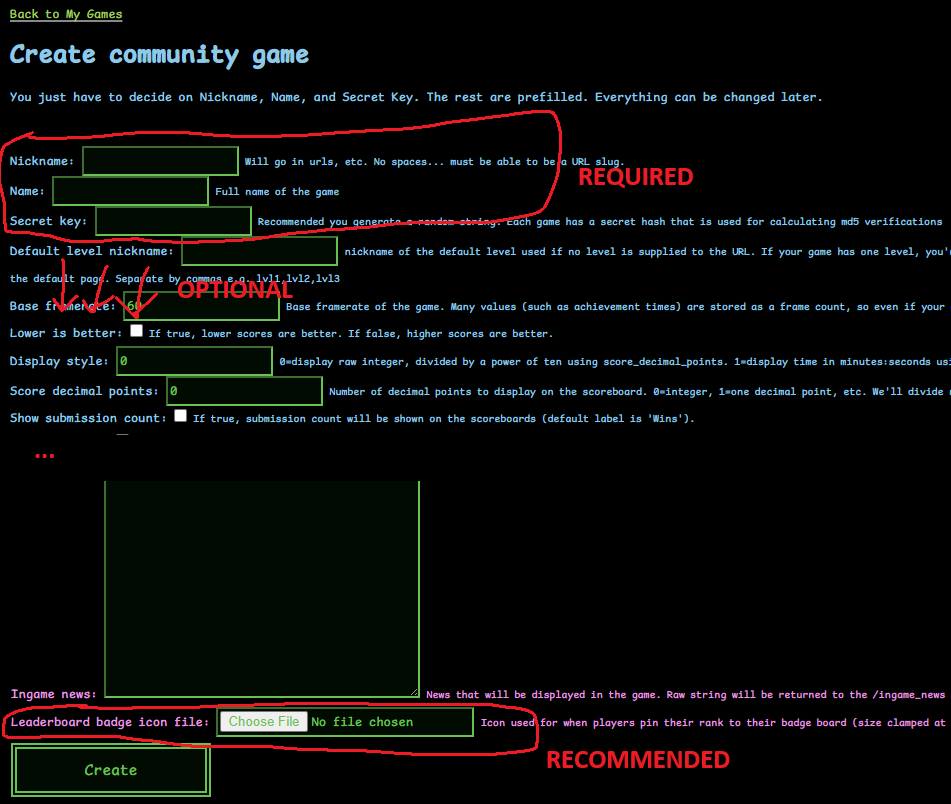
You should see something like this. There are descriptions in there so I'll just reiterate the most important fields here:
Nickname (required): This is the string identifier of your game which will go in urls. Can't have any special characters.
Name (required): This is the user-friendly name of the game (should be able to have any character in it)
Secret key (required): This is a private password which you'll use in your game to generate hashes, ensuring score authenticity. I recommend you generate a random string.
Leaderboard badge icon file (recommended): This is an image which will be displayed in a user's badge board cross-site if they decide to feature their rank in your game. Recommended size 52x52
You can change all of this later so you don't need to worry about it too much. Click "Create" to create your game.
Create levels
After creating a game, you'll end up in the game edit screen where you can always change the info you just entered. You can get here again by going to My Games.
If you scroll down you'll see this levels panel. By default your game is created with a blank level that has a blank nickname "". If your game has only one level I'd encourage you to just leave this alone. But many games will want scoreboards for multiple levels, so you'll want to add these ahead of time via "Create a new level." Just make sure you note the difference between Name (user readable name, can have any characters) and Nickname (url identifier, can't have special characters), as they're easy to confuse.
Create achievements
"Achievements" on arcade2000 work a little differently from traditional game achievements, as they are achieved and tracked per-run rather than per-user. This allows some fancy scoreboard filtering, such as the high score chart of all users who completed the game with a certain weapon, or while doing a specific trick, etc. For example, here is a chart of everyone who used the Plasma Cannon in Evil Egg. Achievements can be pinned to badge boards and could lead to your game being discovered from other parts of the site, so you're highly encouraged to add some!

Adding achievements can be as easy as clicking "batch achievement upload" and selecting a bunch of *.png icons for your achievements (will be resized to 52x52). The nickname of the achievement will match the filename, and the user-readable name will be created by converting "snake_case" to Snake Case. If you need to modify them after you can just edit them in the achievements panel.
Create subscores
"Subscores" are anything you think players might have a fun time tracking. Enemies killed, number of jumps, etc. Subscores aren't just fun to track, players can also create filtered charts with them to have even more ways to compete. For example, here is a chart of everyone who got the biggest scatterbombs in Kersploosh, along with how big they were.

Scroll down to the subscores panel in your game's edit view, then add any subscores you think would be relevant, paying careful attention to the distinction betweem "name" (user readable) and "nickname" (url readable, no special chars).
Game versions
Take note of the "game versions" selector. You have the ability to make new game versions so you don't have to wipe the scoreboard with each new version. To start out, you don't have to do anything here, since version v1 is created automatically, but just note it's there in case you need it in the future.
Score submission
Now that you've set up your game, you're ready to submit scores from it! Submitting a score involves one simple GET request (the same type of web request you can do from your browser by typing an address into it). You'll need to create a string with the proper query parameters. Query parameters are anything that happens after ? in an URL. For example, https://arcade2000.io/a2/api/submit-score-easy/?game=mygame&username=hello&score=123 would have the query parameter "game" set to "mygame, "username" set to "hello", and "score" set to 123 (note you need more parameters than this to successfully submit a score).
To ensure people can't just submit scores by typing in an URL, you combine the first chunk of your query parameters with your game's secret key, then take an md5 hash of it, then tack that md5 hash on as the last query parameter "hash." More on this below, including an automated query string generator for you to play around with, but for now I'll just describe all of the query parameters:
game (required): Your game's "nickname" value, followed by a "." , then your version's identifier ("v1" by default). So for example, you might set this to "mygame.v1". Both game nickname and version number are required.
level (optional): Your level's nickname. If blank will use the game's default_level_nickname (defaults to "" which is the auto-created level's nickname. you can explicitly refer to this level as _ in query strings).
score (required): An integer value which is the score for the run (even if you configure game settings to make it display a time or something, in that case this must still be a raw integer frame value)
local_score_id (optional): This string value (up to 255 chars) is purely for your own use if it makes the web requests easier to manage in your game. It will be echoed back in the JSON when the score is submitted successfully.
frame_length (required): The length in frames of this run. The default game framerate is 60, so this would be the run time in seconds times 60.
username (required): NOTE you can't have special characters here and I wouldn't recommend allowing spaces either! Only a-z, A-Z, 0-9, and _.
device (required): IMPORTANT - You need a unique value of this for every player's machine. Some engines like Godot have methods for this (OS.get_unique_ID() ). Please keep in mind that if there are any special characters, you'll need to either remove them or encode them using % syntax so they can go in a URL. If your engine doesn't support it you might have to resort to generating a random string and storing it in a save file so it doesn't change. Why is this so important? arcade2000's "frictionless" score submission uses the device ID as the actual identifier for score submission. This is the magic that allows players to jump into the charts and customize their profile without ever typing a password. If you leave device as a static value, your score chart won't work, because everyone will be submitting to the same account.
subscores (optional): If you want to submit subscores, first making sure you set up their IDs in your game's edit screen, you can submit them here. You separate subscores with a , and you write each subscore like sub1:123. For example, if they made 23 jumps and killed 43 enemies, you might set this to something like jumps:23,enemies_killed:43.
achievements (optional): If you want to submit achievements, first making sure you set up their IDs in your game's edit screen, you can submit them here. You separate achievements with a , and you write each achievement like sub1:123 (with 123 being the frame on which you got the achievement). By default your frame time is the time in seconds times 60. For example, if they got achievement "triple_backflip" on frame 324 and achievement "weapon_flamethrower" on frame 673, you would set it to triple_backflip:324,weapon_flamethrower:673
The final parameter is hash, but you'll need to compute that based on the built up string from all of the previous parameters. More on that below:
Hashing
When you submit a score, there is a security hash you must calculate, to ensure people don't cheat score submission by just typing scores into an URL. You need to use the md5 hashing algorithm on the query string you've constructed, with the game's secret key tacked on the end. For example, if your secret key is xZyMihUE6TpfwQqC, tack it onto your query string like this:
game=mygame.v1&level=mylevel&score=12345&frame_length=12345&username=hello&device_id=DEVICE_ID_HERE&subscores=sub1:123,sub2:234&achievements=ach:123,ach2:234xZyMihUE6TpfwQqC
Compute the md5 of this string and convert it to hexadecimal. This is your hash, which you must tack onto the end. If done right, you should get a 32-character string where each character is between 0-9 or a-f. Example: 79d18ad4d5ee4cc1b589409c080e58ca. You finalize your query string by making it a request to https://arcade2000.io/a2/api/submit-score-easy/ , then putting &hash=[CALCULATED HASH] on the end of your query string (making sure to not include the actual game secret key, which is private info) like this:
https://arcade2000.io/a2/api/submit-score-easy/?game=mygame.v1&level=mylevel&score=12345&frame_length=12345&username=hello&device_id=DEVICE_ID_HERE&subscores=sub1:123,sub2:234&achievements=ach:123,ach2:234&hash=79d18ad4d5ee4cc1b589409c080e58ca
For easy testing, you can compute hexadecimal md5 hashes here.
So, before you even implement anything in your game, you can test your understanding of the score submission by manually building a score submission URL,
computing the hash using that website, then putting the build URL into your browser and see what the response is. If you can successfully submit a score that
way, then all you have to do is implement that logic in your game.
Purely for testing/example purposes, here is a query string builder that you can use to test the endpoint.
Query String Builder
Score charts / soft-login
The URL for your game's chart is https://arcade2000.io/game/your_game_nickname/. However, when you open this chart from your game, you'll want to add extra query parameters.
It's important to have a way to not just display the high score chart, but also soft-login players who have played your game. If there's no soft-login, players can't use any of the site's features like profile pictures, banner images, decorators, home pages, badge boards, or omni boards (if they get created for community games in the future). For players, soft-login is as simple as clicking "scores" in your game and having a browser window open. They will be magically logged in.
When you open the browser, you'll supply more query parameters to the URL that allow the player to get logged into their account using their device ID, despite the fact that they never set any password. The format is this:
/game/your_game_here/?username=my_username&device_id=DEVICE_ID_HERE&soft_login_game=your_game_nickname&game_version_identifier=v1
username (required): same username they submitted their last score with (you should keep track of it).
device_id (required): as always, make sure you remove or escape any special characters, and make sure you supply it the exact same way you did when
you submitted scores.
soft_login_game (required):
your game's nickname.
game_version_identifier (recommended): the charts will go to your game's current version by default. To make sure previous versions keep going to the appropriate
chart, you can specify the version explicitly in this parameter. If it's the game's current version identifier, it should be cleaned up out of the URL before the page displays, just
like the soft-login query parameters.